Orbit Windows

PASTE ANY LINK.
DWNLOAD ANYTHING.

Connect YouTube, TikTok, Instagram, X, Vimeo, Reddit and 1,000+ sites. Hardware-accelerated 4K/8K downloads, instant MP3 extraction, and zero cloud leaks. Everything stays on your PC.

SUB-SECOND FETCH.
100% PRIVATE.

Zero subscription paywalls, zero cloud telemetry, zero shady web redirect converters. Runs completely locally on your PC with embedded yt-dlp & ffmpeg binaries. No terminal, no Python installation needed.

1,000+ Sites Supported
4K/ 8K Max Resolution
$0forever Free, no ads
100% Local & Private
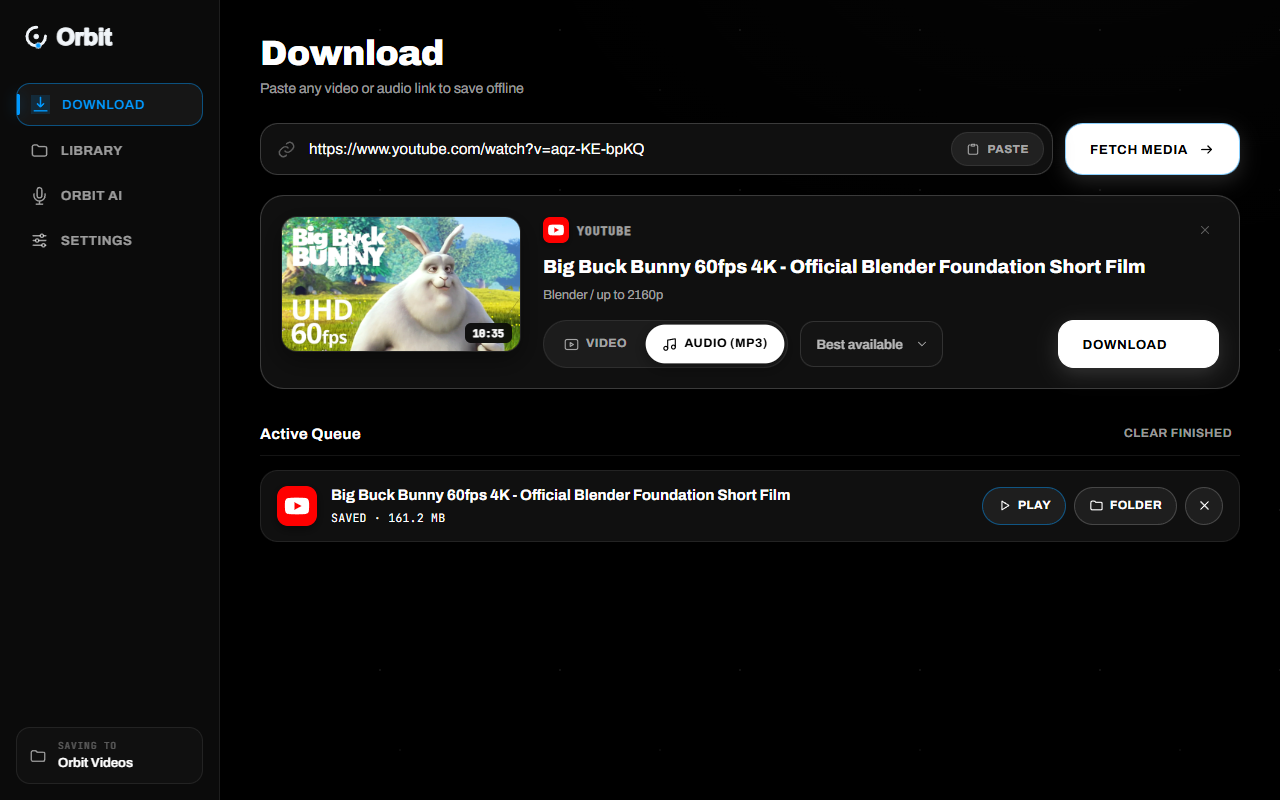
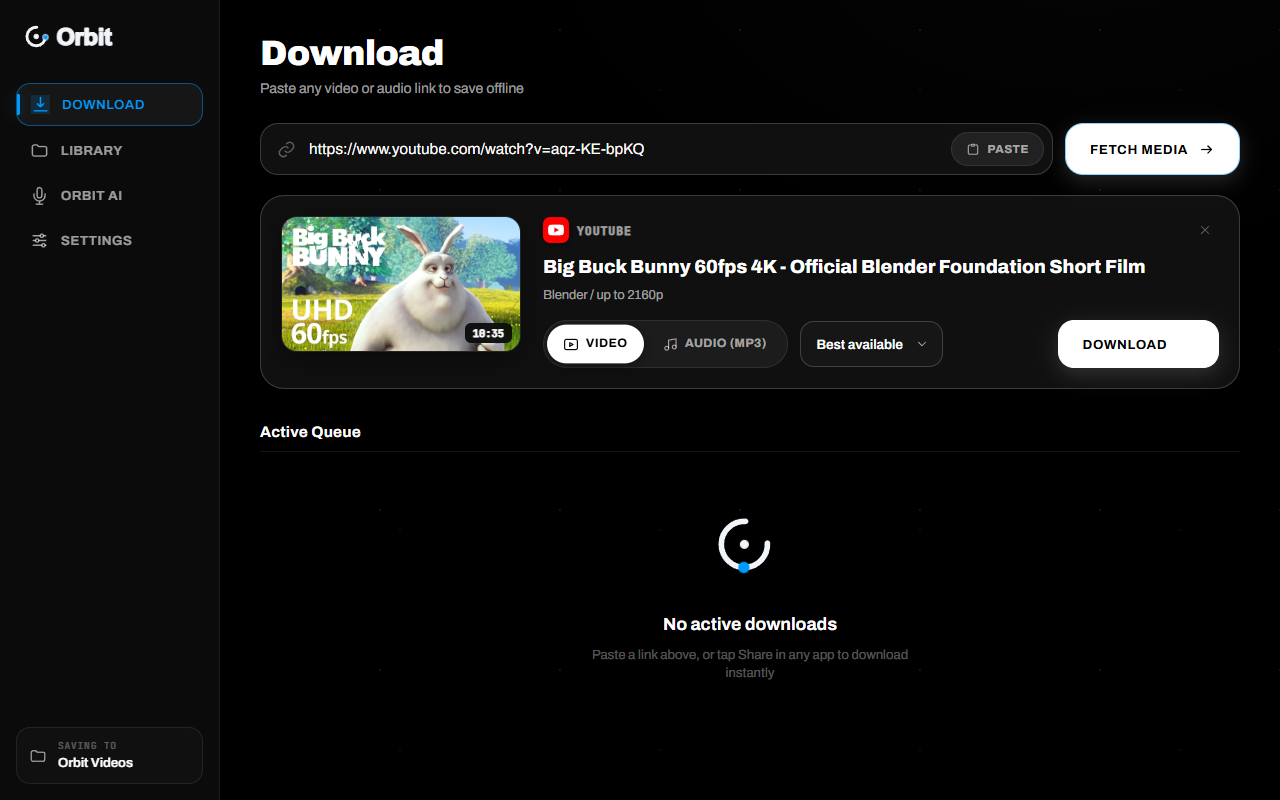
Orbit Main Screen
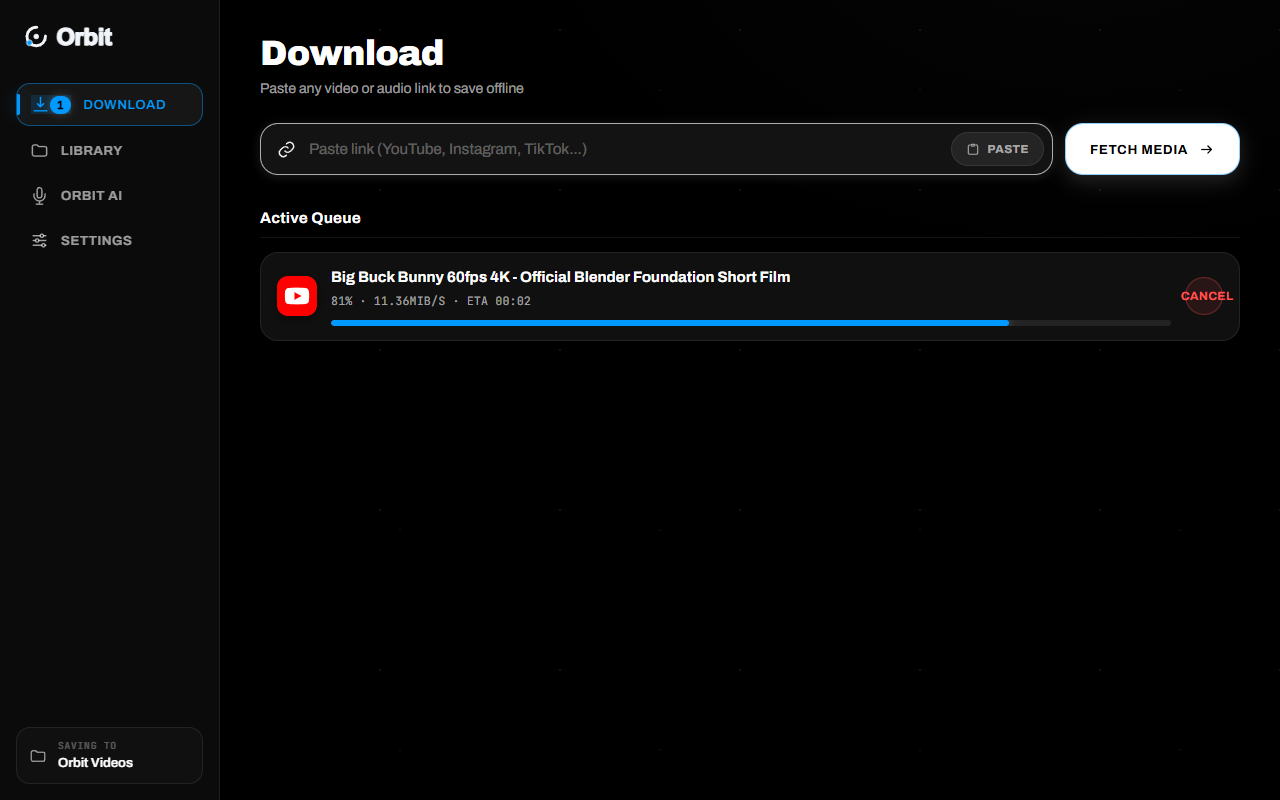
Orbit Download Queue
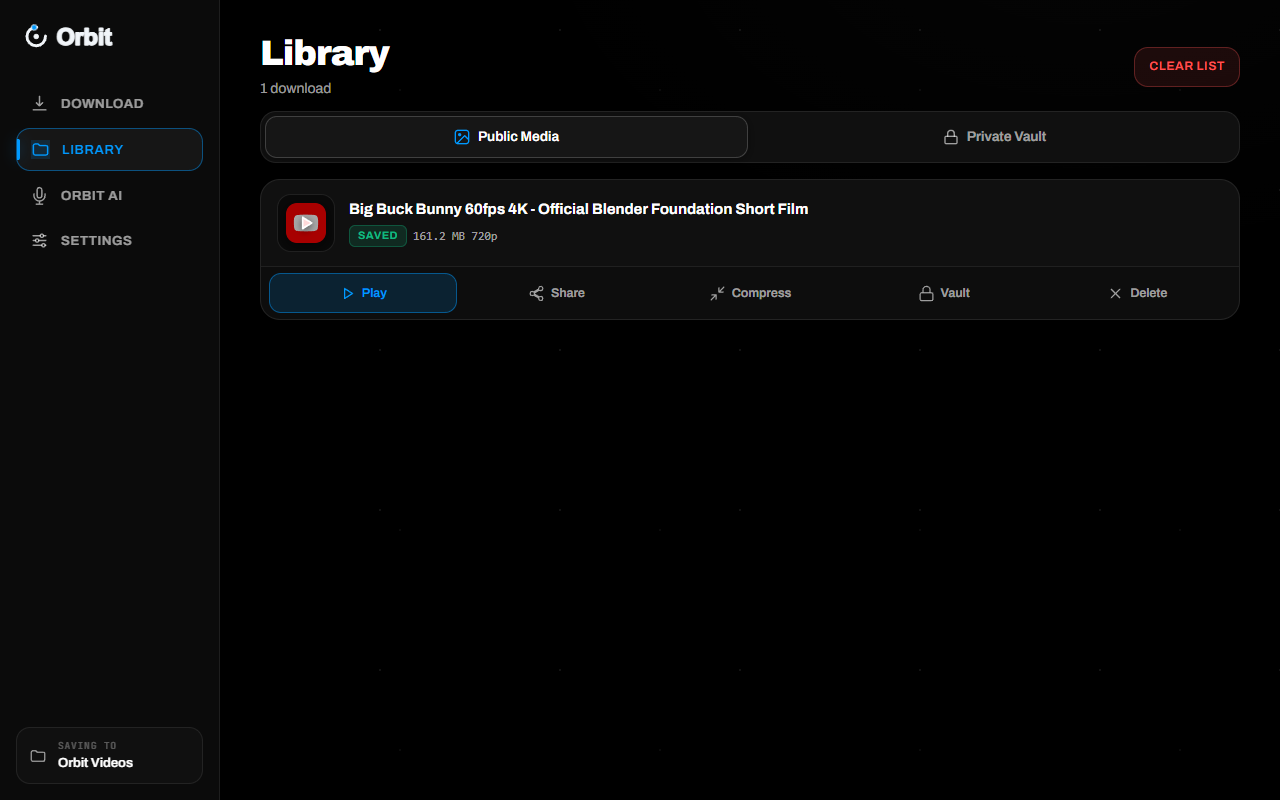
Orbit Local Library
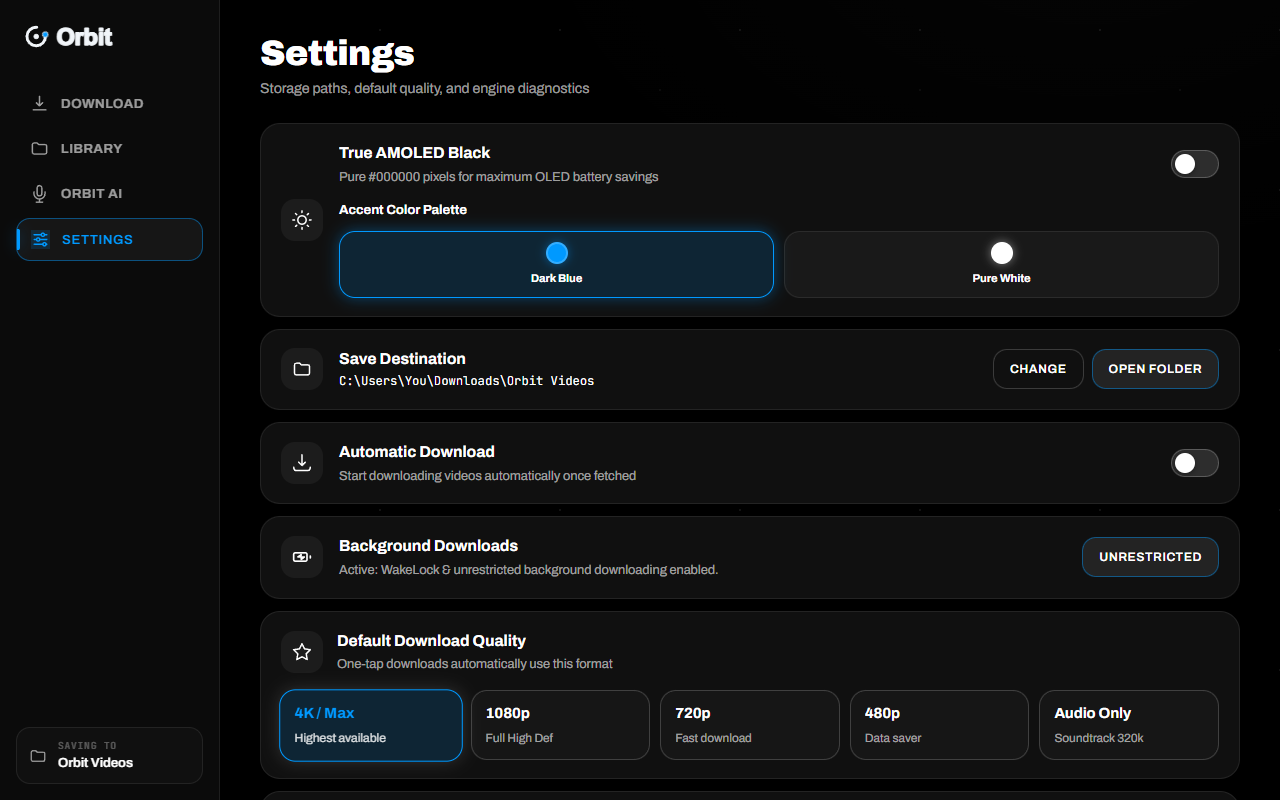
Orbit Settings
0Supported sites
0Max resolution
0Sign ups or paywalls
0Local & private
YouTube & Shorts TikTok Instagram Reels X / Twitter Reddit Vimeo Twitch Clips SoundCloud Bilibili Kick Bluesky Facebook Loom TED Talks YouTube & Shorts TikTok Instagram Reels X / Twitter Reddit Vimeo Twitch Clips SoundCloud Bilibili Kick Bluesky Facebook Loom TED Talks
Threads Pinterest LinkedIn Telegram Snapchat Bandcamp Audiomack Rumble Odysee Dailymotion Internet Archive Khan Academy Wistia Apple Podcasts Threads Pinterest LinkedIn Telegram Snapchat Bandcamp Audiomack Rumble Odysee Dailymotion Internet Archive Khan Academy Wistia Apple Podcasts

01 / Fair Model

FAIR MODEL. ZERO SUBSCRIPTIONS.

Orbit is 100% free. No subscription paywalls, no daily limits, no ad trackers.

Orbit Windows App

FREE

$0

Download the standalone .exe and run it directly on your PC. Zero sign-up, zero ads.

  • Untouched 4K / 8K, 60fps & HDR downloads
  • Embedded FFmpeg & FFprobe binaries
  • Lossless audio extraction as 320kbps MP3
  • 1,000+ supported video & audio platforms
  • Concurrent multi-download background queue
  • Local offline media library & folder reveal
  • Zero cloud tracking or telemetry
Download Free (v1.0.28) Get the Android app

Commercial Downloaders

SUBSCRIPTIONS

$19/mo

Commercial apps lock basic features behind paywalls and web converters spam malicious ads.

  • Resolution capped at 720p or 1080p unless you pay
  • Deceptive popups, malware redirects & tracking cookies
  • Throttled cloud servers that fail on long videos
  • Daily download limits & artificial cooldown timers
  • Require installing separate codecs or terminal tools
  • Store your downloaded links on remote cloud servers

Say goodbye to subscriptions and sketchy web downloaders.

02 / Manifesto

Videos live behind players, ads and cloud paywalls. Orbit runs directly on your Windows PC and streams raw media straight to your disk. No subscriptions. No watermarks. No limits on what you save.

03 / Walkthrough

INTERACTIVE WALKTHROUGH.

From smart clipboard detection to parallel background downloads and offline playback.

Smart Fetch
Download Queue
Offline Library
Settings & Directory

04 / Capabilities

EVERYTHING YOU NEED.

Orbit / 01

1,000+ streaming sites supported.

From mainstream platforms like YouTube, TikTok, Instagram, and X to Vimeo, Reddit, Twitch, and Bilibili. Orbit's yt-dlp core resolves streams effortlessly.

Universal Engine
Universal Link Fetcher01 / 06

Orbit / 02

Pristine 4K, 8K & 60fps HDR.

Orbit automatically pairs the highest-bitrate video stream with pristine audio streams, multiplexing them with bundled FFmpeg without transcoding loss.

4K Quality
Pristine Bitrate Multiplexing02 / 06

Orbit / 03

Instant audio extraction to MP3.

Need podcast episodes, lectures, or music tracks? Toggle "Audio" and Orbit extracts the clean 320kbps MP3 directly from the source video.

Audio Extraction
Lossless Audio Extraction03 / 06

Orbit / 04

Multi-download queue with live ETA.

Queue dozens of videos at once. Orbit manages concurrent workers, displays real-time MB/s throughput, and lets you cancel any job anytime.

Queue Engine
Multi-threaded Transfer Engine04 / 06

Orbit / 05

Your local offline media library.

Never lose track of a downloaded file. The Library view displays file sizes, durations, and provides instant "Open" or "Show in folder" buttons.

Media Library
Persistent Offline Archive05 / 06

Orbit / 06

Zero setup: single standalone .exe.

Everything Orbit needs—including ffmpeg, ffprobe, and Python runtime—is pre-packaged into a single executable. Just double-click and run.

Preferences & Bundling
Pre-Bundled Windows Binary06 / 06

05 / Architecture

WHAT YOU ACTUALLY GET.

01 / Privacy

Nothing leaves your PC.

Zero cloud accounts, zero telemetry, zero analytics. Your downloaded links and files are stored strictly on your own drive.

02 / Speed

Direct socket streaming.

Transfers flow straight from media CDN endpoints directly to your storage without any cloud proxy bottlenecks.

03 / Codecs

Bundled FFmpeg engine.

Full lossless remuxing of VP9, AV1, H.264, AAC, and Opus streams. 4K and 8K videos merge seamlessly with pristine audio.

04 / Control

Customizable destination.

Select any internal drive, secondary SSD, or NAS storage folder. Orbit automatically creates and manages your library.

06 / How it works

FOUR STEPS. ZERO FRICTION.

01

Copy

Copy any URL from your browser, TikTok app, Twitter, or YouTube. Orbit detects clipboard links automatically.

02

Choose

Select Video (Best, 4K, 1440p, 1080p, 720p) or Audio (MP3). Orbit parses available bitrate ladders instantly.

03

Download

Hit Download. Orbit buffers chunks concurrently in the background with live speed and progress readouts.

04

Enjoy

Watch immediately or click "Show in folder" to access your pristine MP4 or MP3 file on your computer.

07 / FAQ

QUESTIONS,
ANSWERED.

Is Orbit really 100% free?

Yes. Orbit is completely free. There are no paid tiers, no subscription paywalls, no daily quotas, and absolutely no ads.

Do I need to install FFmpeg or Python?

No! Unlike command-line yt-dlp tools, Orbit bundles both FFmpeg, FFprobe, and the entire runtime inside a single standalone executable (Orbit.exe). It works out of the box on any Windows 10 or 11 PC.

Which platforms can I download from?

Orbit supports YouTube, Shorts, TikTok, Instagram Reels, X (Twitter), Vimeo, Reddit, Twitch, SoundCloud, Bilibili, Facebook, Kick, Bluesky, Loom, and over 1,000 other websites supported by yt-dlp.

Where are my downloads saved?

By default, files are saved in your Downloads\Orbit Videos directory. You can customize the save directory to any drive or folder in the Orbit Settings tab.

Why does Windows SmartScreen show a blue warning?

Because Orbit is a brand-new executable that is not code-signed with an expensive enterprise certificate. Simply click More info → Run anyway.

Can I download audio-only as MP3?

Yes. Select the "Audio" tab and choose MP3. Orbit extracts the highest quality audio stream and converts it into a clean MP3 file with embedded metadata.

Ready to archive?

BRING THE LINK.
WE'LL SAVE THE FILE.

Download Free (v1.0.28)
Downloading Orbit.exe... Check your browser downloads!